










How Google Search Console Works: A Complete Beginner to Advanced Guide
Introduction to Google Search Console
If you own a website, blog, or online store, Google Search Console (GSC) is not optional it’s essential. Think of it as Google directly talking to you about your website. It tells you how your site appears in Google Search, what’s working, what’s broken, and what needs improvement.
Google Search Console is a free tool provided by Google that helps website owners monitor, maintain, and improve their site’s presence in search results.
How Google search console works
Here is the official link of Google search console…
Why Google Search Console Is Important for SEO
SEO without data is like driving blindfolded. Google Search Console gives you real data straight from Google, not estimates.
Key benefits include:
-
Understand how users find your site
-
Track keyword performance
-
Identify indexing issues
-
Improve click-through rates (CTR)
-
Monitor technical SEO health
Important: Google Search Console does not directly improve rankings but using its data correctly can.
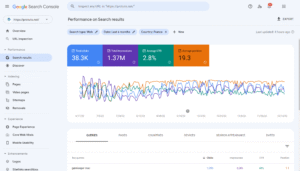
How Google search console works
Who Should Use Google Search Console
Anyone who has a website:
-
Bloggers
-
SEO professionals
-
Digital marketers
-
Business owners
-
Developers
-
Content writers
If your website appears on Google (or you want it to), you should be using GSC.
Is Google Search Console Free?
Yes. 100% free. No hidden costs. No premium plans.
All you need is a Google account and website ownership.
Right here you can explore that how you can add an AdSense account to your website for free
How Google Search Console Works (Overview)
At its core, Google Search Console collects data from Google’s search index and presents it in an easy-to-understand dashboard.
How the process works:
-
Google crawls your website
-
Google indexes your pages
-
Search Console reports performance data
-
You analyze and optimize based on insights
Simple in theory powerful in practice.
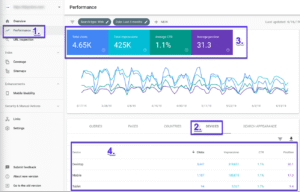
How Google search console works
Data Collection Process
Google uses bots (called Googlebot) to crawl your website. Once crawled, pages are analyzed for:
-
Content quality
-
Keywords
-
Mobile usability
-
Page speed
-
Security
This information is then reflected inside Google Search Console.
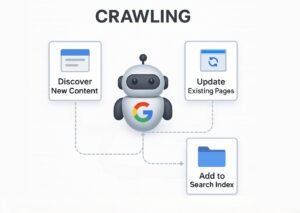
How Google search console works
How Google Tracks Your Website
Google tracks your site through:
-
URLs discovered via links
-
Submitted sitemaps
-
Manual URL inspection requests
Important: If Google cannot crawl your site, it cannot rank it.
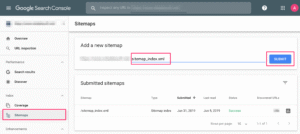
How Google search console works
Setting Up Google Search Console
Adding a Website Property
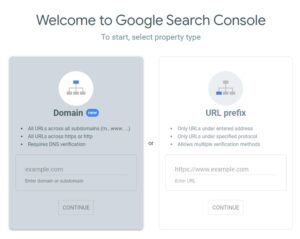
There are two property types:
| Property Type | Coverage |
|---|---|
| Domain Property | Covers all subdomains & protocols |
| URL Prefix Property | Covers a specific URL only |
Verification Methods
Domain Verification
-
Uses DNS record
-
Best for full website coverage
-
Requires domain access
URL Prefix Verification
-
HTML file upload
-
Meta tag
-
Google Analytics
-
Google Tag Manager
Pro tip: Domain verification is recommended for serious SEO.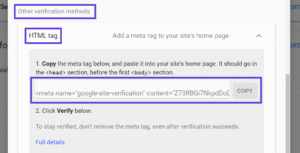
Verification Code
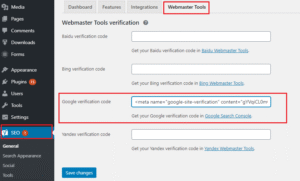
Submit page in your site
Understanding the Google Search Console Dashboard
The dashboard may look complex at first, but it’s logically organized.
Main sections include:
-
Performance
-
Indexing
-
Experience
-
Enhancements
-
Security & Manual Actions
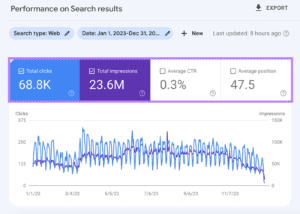
Performance Report Explained
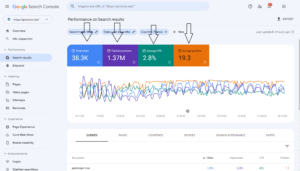
This is the heart of Google Search Console.
Key metrics explained:
| Metric | Meaning |
|---|---|
| Clicks | Number of visits from Google Search |
| Impressions | How many times your site appeared |
| CTR | Click-through rate |
| Average Position | Average ranking position |
Bold insight: A page can rank well but still get low clicks due to poor titles or meta descriptions.
Search Queries and Keywords Analysis
GSC shows actual keywords users typed to find your website.
Why this is gold:
-
Discover hidden keywords
-
Optimize existing content
-
Improve low CTR pages
This data is far more reliable than third-party tools.
Indexing and Pages Report
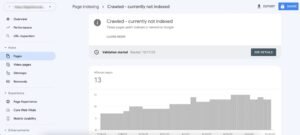
This section tells you which pages are indexed and which are not.
Common indexing statuses:
-
Indexed
-
Crawled – currently not indexed
-
Discovered – currently not indexed
-
Excluded
Common Indexing Errors
| Error | Meaning |
|---|---|
| Noindex | Page blocked intentionally |
| 404 | Page not found |
| Redirect error | Broken redirection |
| Server error | Hosting issues |
Fixing these issues improves crawl efficiency and rankings.
URL Inspection Tool
This tool lets you inspect a single URL in real time.
What it shows:
-
Indexing status
-
Mobile usability
-
Canonical URL
-
Crawl date
When to Use It
-
After publishing new content
-
After updating old content
-
When fixing errors
Sitemaps in Google Search Console
What Is a Sitemap
A sitemap is like a map for Google, showing all important pages of your site.
How to Submit a Sitemap
-
Go to “Sitemaps”
-
Enter sitemap URL
-
Click submit
Example: https://example.com/sitemap.xml
Core Web Vitals and Page Experience
What Are Core Web Vitals
These measure real user experience:
-
Largest Contentful Paint (LCP)
-
First Input Delay (FID)
-
Cumulative Layout Shift (CLS)
Why They Matter
Better user experience = better rankings.
Mobile Usability Report
With mobile-first indexing, mobile usability is critical.
Common Mobile Issues
-
Text too small
-
Clickable elements too close
-
Content wider than screen
Fixing these improves both UX and SEO.
Links Report (Backlinks & Internal Links)
External Links
Shows which sites link to you.
Internal Links
Shows how pages link within your site.
Strong internal linking = better crawling and rankings.
Security & Manual Actions
Manual Penalties Explained
If Google penalizes your site manually, it will appear here.
Security Issues
Includes:
-
Malware
-
Hacked content
-
Phishing
Fix immediately to avoid deindexing.
Google Search Console vs Google Analytics
| Feature | GSC | GA |
|---|---|---|
| Search performance | ✅ | ❌ |
| User behavior | ❌ | ✅ |
| Keywords data | ✅ | ❌ |
| Traffic sources | ❌ | ✅ |
Best practice: Use both together.
Best Practices to Use Google Search Console Effectively
-
Check performance weekly
-
Fix indexing errors immediately
-
Optimize low-CTR pages
-
Submit updated sitemaps
-
Monitor Core Web Vitals
Common Mistakes Beginners Make
-
Ignoring warnings
-
Not checking mobile issues
-
Obsessing over average position
-
Not using URL inspection
-
Forgetting sitemap submission
Future of Google Search Console
Google continues to improve GSC with:
-
Better UX reports
-
AI-powered insights
-
More accurate performance data
Expect deeper integration with search algorithms in the future.
CONCLUSION
Google Search Console is the most powerful free SEO tool available. It shows exactly how Google views your website and provides actionable insights to improve rankings, traffic, and user experience. If you’re serious about SEO, mastering Google Search Console is non-negotiable.
FAQs
1. Does Google Search Console improve rankings directly?
No, but using its insights correctly can significantly improve rankings.
2. How often does Google Search Console update data?
Usually every 24–48 hours, with a small delay.
3. Can beginners use Google Search Console?
Yes. It’s beginner-friendly with advanced depth.
4. Is Google Search Console accurate?
Yes. The data comes directly from Google.
5. How long does it take to see data after setup?
Typically 1–3 days after verification.
Please don’t forget to leave a review.











Trackbacks/Pingbacks