











How to Add an AdSense Account to Website in 2026, Step by step guide
Introduction
Google AdSense continues to be one of the most reliable monetization options for website owners in 2025. While the core idea remains simple—show ads and earn money—the approval process, policies, and optimization methods have evolved significantly.
Understanding Google AdSense in Simple Terms
Google AdSense is a publisher monetization program where Google displays ads from advertisers on your website. You earn revenue when visitors see or interact with those ads. Google manages advertisers, bidding, ad relevance, and payments, allowing publishers to focus on content.
Ad earnings depend on:
-
Visitor location
-
Content niche
-
Ad competition
-
User engagement
Unlike affiliate marketing, AdSense does not require selling products—traffic and trust are the key assets.

Add an AdSense Account to Website
Is Your Website Ready for AdSense in 2026?
Google no longer publishes a strict checklist, but successful approvals usually share these characteristics:
Essential Conditions
-
You must be legally eligible (18+)
-
The website must be under your control
-
Content must be human-written, useful, and original
-
The site must respect Google content policies
Strong Approval Signals
-
Clear navigation and logical structure
-
Informational pages (About, Contact, Privacy Policy)
-
Mobile responsiveness
-
HTTPS security
-
No misleading elements or auto-generated content
In 2026, Google evaluates user value, not word count or traffic numbers.
After creating adsense account you need to know about the google search console as well for content indexing in google so here is detailed step by step guide of Google search console.
Creating Your Google AdSense Account for website
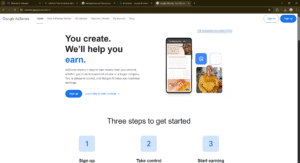
Step 1: Opening a Google AdSense Account
To begin monetization:
-
Sign in with a Google account
-
Submit your primary website URL
-
Choose your country and payment profile details
-
Accept AdSense terms
At this stage, your account is not yet active. Website verification is mandatory before review.
Step 2: Adding Your Website to AdSense
Inside the AdSense dashboard:
-
Navigate to Sites
-
Submit your website address
-
Save the entry
Google will now generate a verification script, which acts as proof of ownership.
Step 3: Website Verification (Critical Step)
Verification confirms that you control the domain.
Common Methods
-
Insert the AdSense script inside the
<head>section -
Use CMS plugins (WordPress users often prefer plugin-based insertion)
-
Platform-level header injection for non-WordPress sites
Once added:
-
Return to AdSense
-
Request site review
Do not remove the code until approval is complete.
Step 4: How the Review Process Works
Review Timeline
-
Fast approvals: 1–3 days
-
Average cases: 7–14 days
-
New sites: may take longer
What Google Evaluates
-
Content usefulness
-
Policy compliance
-
Page layout and usability
-
Trust signals
-
Spam indicators
You will receive a confirmation email whether your site is approved or needs improvement.
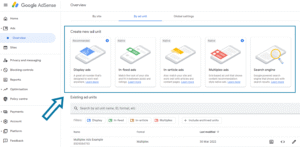
Step 5: Activating Ads After Approval
Approval does not automatically display ads. You must configure them.
Two Main Options
Automatic Ads
-
Google selects placements
-
Best for beginners
-
Requires minimal setup
Manual Ad Placement
-
Full control over placement
-
Ideal for experienced publishers
-
Better layout customization
Ad formats include display ads, in-content ads, feed-style ads, and mobile anchors.
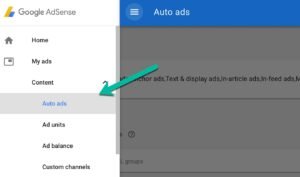
Step 6: Increasing AdSense Revenue the Right Way
In 2025, smart optimization beats aggressive ad placement.
Best Practices
-
Prioritize content quality over ad quantity
-
Place ads where users naturally pause
-
Avoid cluttered layouts
-
Improve site speed
-
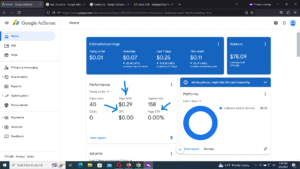
Monitor performance metrics regularly
High engagement results in better ad bidding, which directly improves earnings.

Advantages of Using Google AdSense
Pros
-
No advertiser outreach needed
-
Reliable monthly payouts
-
Global advertiser pool
-
Easy scaling with traffic growth
-
Suitable for almost all niches
Limitations You Should Know
Cons
-
Strict enforcement of policies
-
Earnings depend heavily on visitor geography
-
Limited control over ad brands
-
Low income for small or untargeted traffic
AdSense works best as a foundation, not the only monetization method.
Top Reasons Websites Get Rejected
Most rejections happen due to:
-
Low-value or AI-spun content
-
Missing legal pages
-
Poor site structure
-
Copyright misuse
-
Policy-restricted topics
The good news: rejections are fixable.
Policy Safety Tips (Very Important)
-
Never click your own ads
-
Avoid click encouragement
-
Keep ads separate from navigation
-
Do not buy fake traffic
-
Review policy updates regularly
One serious violation can permanently block your account
Is Google AdSense Still Worth Using in 2026?
Yes but with realistic expectations.
AdSense is ideal for:
-
Informational blogs
-
Tech and niche websites
-
Beginners in monetization
-
Long-term content creators
Many high-earning sites later combine AdSense with affiliate marketing or direct sponsorships.
My Opinion
In my opinion, Google AdSense is still one of the most practical and beginner-friendly monetization options available in 2026, especially for content-based websites. While many people expect instant income, AdSense works best when you treat it as a long-term strategy rather than a quick-money tool.
Overall, my honest opinion is that Google AdSense is a strong foundation for monetization in 2025. It may not replace advanced income methods like affiliate marketing or sponsorships, but when combined with them, it can become a stable and reliable source of passive income. For anyone serious about growing a content website, AdSense is definitely worth using—with patience, consistency, and a focus on quality.
Final Verdict
Adding Google AdSense to your website in 2026 remains a legitimate and sustainable monetization method when done correctly. Success depends on content value, trust, and patience, not shortcuts.
FAQs
1. What is Google AdSense and how does it work?
Google AdSense connects website owners with advertisers. Google displays ads on your website, and you earn revenue when users view or interact with those ads. The system automatically matches ads to your content and audience.
2. Can I apply for Google AdSense with a new website in 2026?
Yes. There is no official minimum age or traffic requirement for websites. However, new sites must have useful, original content and a clean structure to be approved.
3. How long does Google AdSense approval take?
Approval time varies. Some websites are reviewed within 24–72 hours, while others may take 1–2 weeks depending on content quality and policy compliance.
4. Why was my Google AdSense application rejected?
Common reasons include thin content, missing legal pages, policy-restricted topics, poor navigation, or copied material. Most rejections can be fixed, and you can reapply after improvements.
5. Do I need traffic to get AdSense approval?
No minimum traffic is required. Google focuses more on content value and user experience rather than visitor numbers.
Please don’t forget to leave a review.











Trackbacks/Pingbacks